HushPic
Your photos say more than you think.
Your kids' faces in a group chat. Private photos on every device iCloud reaches. HushPic finds them, hushes the people you protect and keeps watching as you take new photos. All on your iPhone.
We never see your photos. HushPic has no server to send them to.
Apple privacy label: Data Not Collected
- No account
- Works offline, even in airplane mode
- Your photos never leave your iPhone
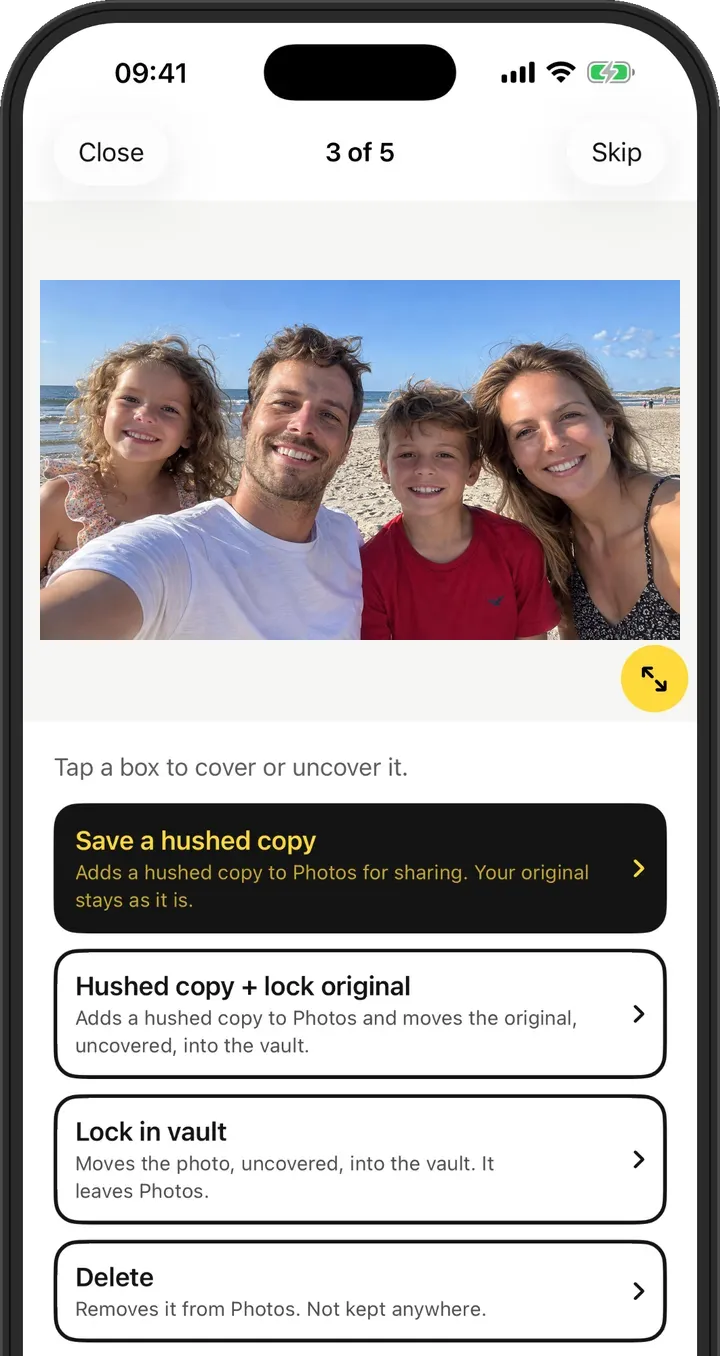
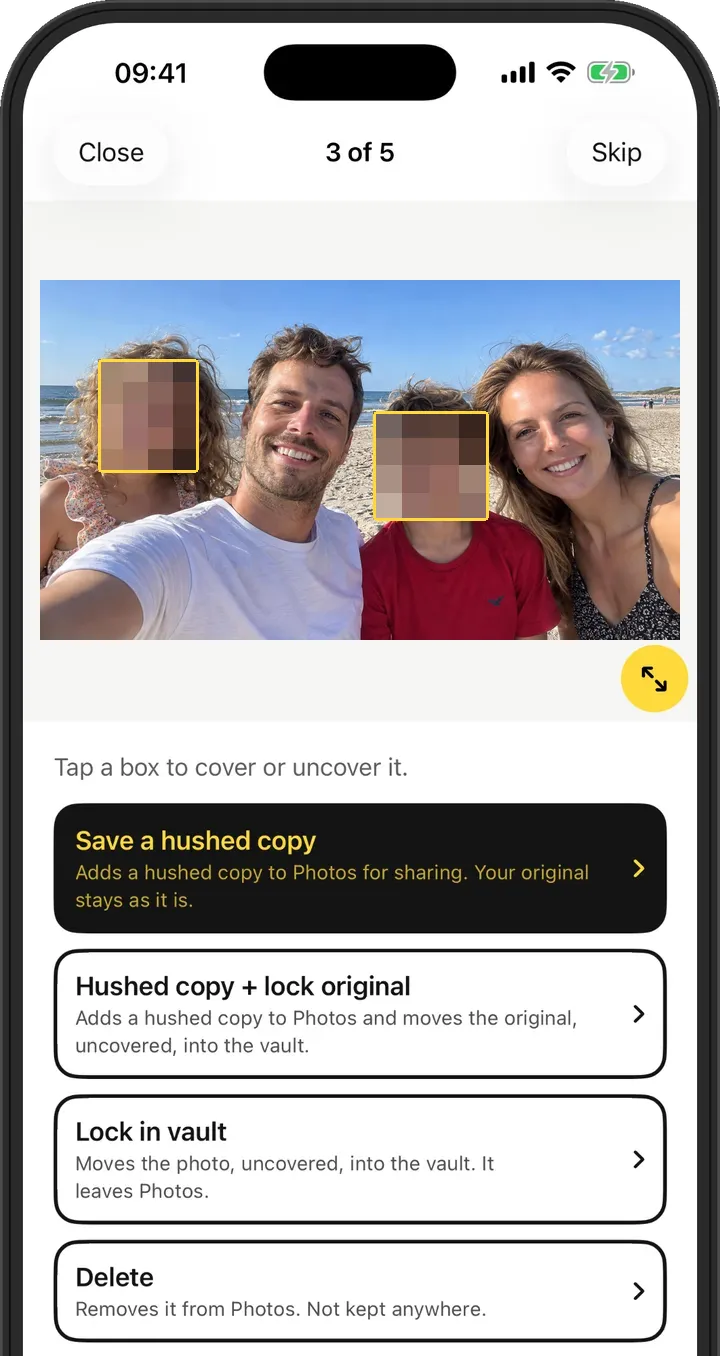
Four things HushPic does for you.
Not a one-time clean-up. HushPic protects the people and photos that matter, and keeps doing it as your library grows.
Your kids and family, hushed
Add the people you protect once. HushPic hushes their faces in every photo, automatically, before you share.
Private photos, out of reach
Private and 18+ photos move into an encrypted vault: out of iCloud, off shared devices, away from hacked accounts and leaks.
The clues AI can read
Passports, bank cards, passwords in screenshots, street signs and licence plates. HushPic finds what tells a stranger who you are and where to find you.
It keeps working
New photos keep coming. HushPic checks them and lets you know when one shows someone you protect, a document or a street sign.
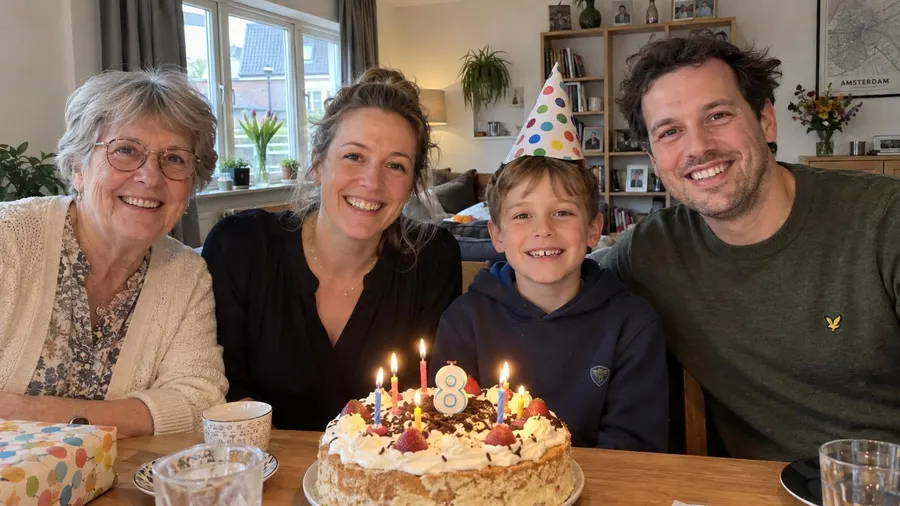
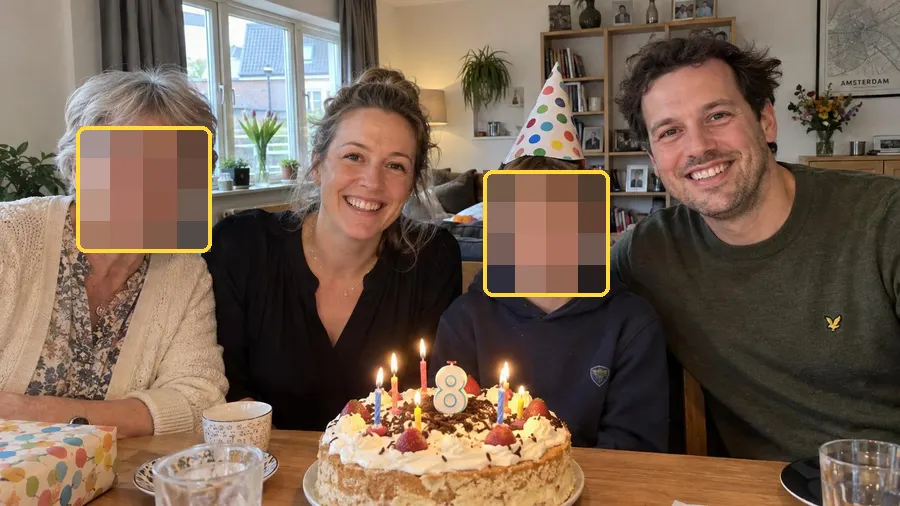 Rita
Lev
You
Protected faces
- RRitaHushed in every photo
- LLevHushed in every photo
- Add a personPick 3 to 10 photos and tap their face
Example. Your own list stays on your iPhone.
Hush the people you protect.
Add someone once: your kids, your partner, a parent or a friend who stays offline. Pick 3 to 10 photos and tap their face. From then on HushPic hushes only them, in every photo. Everyone else stays visible, you included, and you can still tap any face to hush it too.
- Face matching runs on your iPhone's own chip. The face prints stay on your iPhone. Works in airplane mode.
- No account, no cloud. Face prints are not tied to your Apple Account or anything else.
- Encrypted on this iPhone and left out of every backup. Remove a person and their prints are gone.
Set it up once and stop checking every photo yourself. Find Protected faces on the home screen and in Settings.
Free to set upYour nudes. Your eyes only.
Keep them, that is your call. But iCloud Photos also puts them on your iPad, your Mac and the Apple TV in the living room. And a hacked iCloud account, or an app you gave access to all your photos, can reach them too. Eyes only finds photos that may show nudity, so you choose: move them into the vault, out of your library and out of iCloud, or delete them.
- Uses Apple's own sensitive content check, on your iPhone
- They stay blurred in HushPic, so nobody sees them over your shoulder
- Lock them in the encrypted vault, out of your camera roll
- Or delete them, one by one or all at once
It keeps working. Tomorrow too.
You keep taking photos and sharing them, so HushPic keeps checking. Turn on reminders and it tells you when new photos show someone you protect, a document or a street sign. Hush them in a tap, before they go anywhere.
- At most one reminder a day, and only when there are new photos
- New photos are checked on your iPhone, like everything else
- With Pro, hushing never runs out: for this year's photos and next year's
One scan. Five piles.
HushPic looks at every photo you have, not just the one you are about to send, and sorts what it finds into piles you can clear one by one.
Location
Photos that carry GPS and show where you were, including where you live.
Faces
Your kids, your friends, your family. Hush them before a photo goes public.
Documents & passwords
Passports, bank cards, payslips, and screenshots with a password or personal details.
Street signs & plates
Street names, house numbers and licence plates that point to a place.
Eyes only 18+
Photos that may show nudity, found with Apple's own sensitive content check on your iPhone.
Removing GPS is no longer enough. AI tools can work out where a photo was taken from what is in it: a street sign behind your kids, the number on your door. HushPic looks for those clues too.
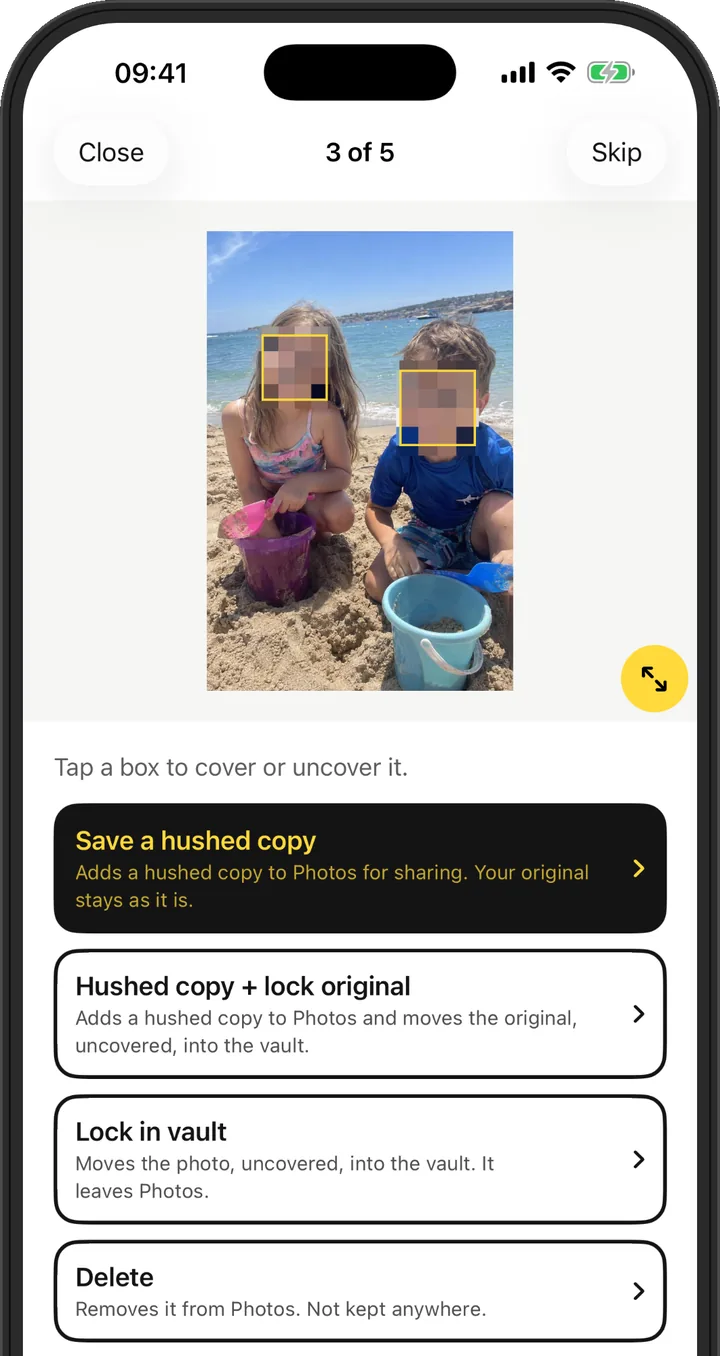
Hush it, lock it or let it go.
A photo in a group chat can travel far beyond the people you sent it to. Every find opens in the fix screen: tap a box to hush it or leave it sharp, then choose what happens to the photo.
- Save a hushed copyA copy for sharing goes to Photos. Your original stays as it is.
- Lock in vaultThe photo moves into an encrypted vault, opened with Face ID.
- DeleteRemoved from Photos. iOS asks you first.
- IgnoreNothing changes. HushPic stops showing it.
A whole pile to clear? Hush all does it in one go, and you can still review them one by one.
Your trail
- Where you probably live23 photos taken here, on 14 different evenings.
- Where you spend your weekdays41 photos taken here during working hours, on 26 different days. Most likely work or school.
- A place you keep going back to9 photos taken here, on 6 different days.
- Street names and plates12 photos show clues that AI can place, even without GPS.
Example. Your own trail is worked out from your photos.
Your photos draw a map to you.
One photo says little. Together they tell a stranger where you live, where you work or go to school, and where you keep going back to. Your trail connects the dots the way a stranger would, so you see it first.
Tap a finding to see the photos behind it, and remove their location in one tap. Your trail is on the home screen. It is worked out on your iPhone from the place and time in each photo. HushPic looks up no addresses and draws no map, so not even Apple learns these places.
Wiping your trail is free, for all your photosNothing leaves your iPhone.
- Every photo is checked on the device
- No account, no sign-up, no email
- No servers, no analytics, no tracking
- Works in airplane mode
- Apple privacy label: Data Not Collected
Honest about limits.
Great, not perfect. Getting better.
HushPic catches most of what gives you away, but no automatic check catches everything. We sharpen detection with every update, and you always see what it found, so you stay in control of what you share.
Deleted is not gone yet
iOS keeps deleted photos in Recently Deleted for 30 days, and apps cannot empty it. HushPic tells you how to clear it yourself. The vault lives on this iPhone only, so take out what you want to keep before you switch phones.
Free to look. Pro to hush it all.
Scanning, protected faces, reminders and removing the location are free. Pro is for when you want HushPic to keep protecting everything, without limits.
Free
No account, no trial clock.
- Scan your whole photo library
- See your trail and wipe it
- Set up protected faces
- Reminders about new photos
- Remove the location from all your photos
- 10 hushes every month
- A vault for up to 50 photos
HushPic Pro
Yearly, or once for life.
- Everything in Free
- Unlimited hushing, for the photos you take next year too
- Unlimited vault
- Still nothing leaves your iPhone
If you stop Pro, you keep full access to your vault and everything in it. You can add photos to it again once it holds fewer than 50, and you get 10 hushes a month again. Prices are shown in the App Store in your own currency. Subscriptions renew automatically unless you cancel at least 24 hours before the end of the current period. Manage or cancel any time in your Apple Account settings.
Questions
Does HushPic upload my photos?
No. Every check runs on your iPhone. HushPic has no server to send photos to, and you can run a full scan in airplane mode to see for yourself.
How do I blur faces in iPhone photos?
Open a photo in HushPic and tap a face. HushPic hushes it with a heavy pixel blur and saves a hushed copy for sharing, next to the original. Add your kids or family as protected faces and HushPic finds and hushes them in every photo by itself. Faces are found on your iPhone, nothing is uploaded.
How do I hide private photos on iPhone?
The Hidden album in Photos still syncs to iCloud and your other Apple devices. The HushPic vault takes a photo out of your library and out of iCloud, and encrypts it on your iPhone. Only you open it, with Face ID. Free holds up to 50 photos, Pro is unlimited.
How do I remove the location from iPhone photos?
HushPic finds every photo with GPS data and removes the location in one tap, for one photo or all of them at once. That is free. It also points out photos where a street sign or licence plate gives the place away, even without GPS.
What is Your trail?
HushPic puts the place and time of your photos together and shows the pattern a stranger could find: where you probably live, where you spend your weekdays and places you keep going back to. It also counts the photos with street names or plates that AI can place even without GPS. Each finding shows the photos behind it, and one tap removes their location, for free. It all happens on your iPhone, without looking up addresses.
How do protected faces work?
Add a person once by picking 3 to 10 photos of them and tapping their face. They can be anyone: your kids, your partner, a friend who stays offline. From then on HushPic hushes only their faces. Everyone else stays visible, you included, and you can still tap any face to hush it. Recognition runs on your iPhone with a model built into the app. Face prints stay on the device, encrypted, and never go into a backup, so on a new iPhone you add people again.
What counts as a hush?
One hushed copy is one hush, also when HushPic hushes your protected faces. Free gives you 10 each month and Pro is unlimited. Scanning, reminders, removing the location, setting up protected faces, locking photos in the vault (up to 50 on Free), deleting and ignoring do not count.
How do reminders work?
Turn them on in HushPic and allow notifications. Now and then iOS lets HushPic check your newest photos in the background, on your iPhone. If they show someone you protect, a document, a street sign or a location, you get one reminder, at most once a day. You can turn reminders off in Settings at any time.
What happens if I stop Pro?
Nothing is taken away. You keep full access to your vault and every photo in it, and you can still open, save or delete them. If the vault holds more than 50 photos, you cannot add new ones until it holds fewer than 50, and you go back to 10 hushes a month.
What happens to my original photo?
A hushed copy is saved next to it and the original stays as it is. A hushed copy cannot be unhushed later, so if you may want the original, choose "Hushed copy + lock original": the copy goes to Photos and the original moves into the vault.
How does Eyes only work?
Eyes only uses Apple's own sensitive content check, which runs on your iPhone. It stays off until you turn on Sensitive Content Warning in Settings, under Privacy & Security. HushPic shows you how. Photos it finds stay blurred in the app, and you can lock them in the vault or delete them.
Can I open my vault on a new iPhone?
No. The key lives in this iPhone's Keychain and never leaves it, which is what keeps the vault private. Before you switch phones, take out the photos you want to keep. If you delete the app, the vault is deleted with it.
Is my photo safe to share after HushPic?
Much safer, but give it a quick look. HushPic removes the location and hushes what it finds, and we keep improving what it can spot. Automatic detection can still miss something, so check a hushed copy before you post it.
Which iPhones and languages?
Any iPhone on iOS 17 or later. The app speaks English, Dutch, German, French, Spanish, Italian and Brazilian Portuguese.
I bought Pro. How do I get it on another iPhone?
Sign in with the same Apple Account, open HushPic Pro and tap Restore. Purchases go through Apple, so we never see your name or payment details.
Hush before you share.
Free to download. For iPhone with iOS 17 or later.